
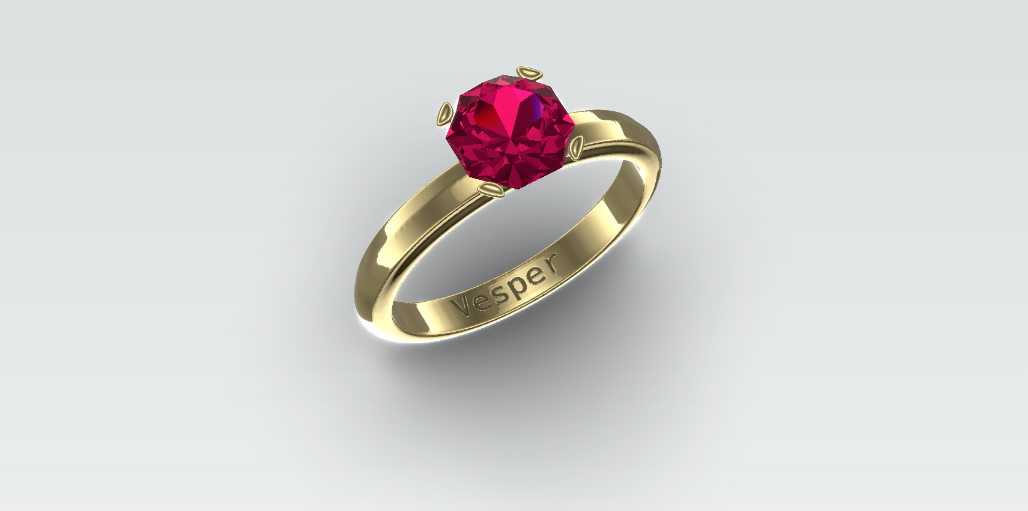
Ring Configurator
An embeddable 3D ring player with a postMessage API, built at Morpheus+ so any host UI can drive metal, stone, and engraving live.
- Problem
- People struggle to picture customizations on physical products until they can see the change happen in front of them.
- Contribution
- As CTO of Morpheus Plus I designed and built the Houdini-to-WebGL ring player and the host API so jewellery (and later other) UIs could stay thin iframes of the same scene.
- Impact
- The same player powered luxury product pages and developer demos; the pattern later scaled into larger configurators for cars and materials.
Open live demo — Player and UI demos are public; the interactive sections below embed the live player.
This project is from May 2024. I am publishing the write-up here in January 2026 so it sits with the rest of the Magaji.dev case studies. I designed it for Morpheus+ as a demo for a jewellery client, while I was CTO of Morpheus Plus.
It is easier for customers to visualize customizations they are making on physical objects when they can see those changes live. That is the whole pitch. Jewellery is the example here, but the same idea applies to almost anything you would rather not order blind.
We kept the 3D piece intentionally dumb from the host’s point of view: a transparent iframe, like a YouTube embed, that listens for JSON messages. The host owns the brand, the cart, and the copy. The player owns the ring, the lighting, and the camera.
Same scene, different chrome. The interesting part is how thin you can make the UI once the player is honest about its API.
One text field, three rings
Each frame below is its own instance of the player. Metals, stones, camera poses, and fonts start different. The text box at the bottom only updates the engraving normal map, and each ring keeps its own font.
One text field, three fonts: cursive, serif, and monospace. Drag any ring to orbit; each starts from a slightly different band angle.
Same player, two UIs
The prototype UI dump at Morpheus+ was never meant to be the product. The product is whatever skin you put around the iframe. Here are two made-up brands on the same API: Vespera as a quiet retail panel, and Sparkkit as a louder product demo.
Vespera
Possible to engrave
Solitaire
A quiet band and a single stone. Change the metal and watch the same player update without reloading.
A guided shop (dummy checkout)
Vespera again, this time as a short flow: metal, shape, gem, engraving, review, then a fake place-order step with additive demo pricing. Nothing is charged. You can reset and walk it again.
Demo boutique
Vespera
Vespera Solitaire
Configure metal, cut, stone, and engraving. Prices are demo-only; nothing is charged.
- Metal
- Shape
- Gem
- Engrave
- Review
- Done
Choose a metal
Stone shape
Gem type
Engraving
Up to 20 characters. Adds $75 in this dummy cart.
Review
Total (demo pricing)
Order placed (demo)
Nothing was charged. Order id .
Total
How the player is put together
The geometry is a Houdini GLTF export. Node names matter: Body for the band metal, BodyText for the engraveable strip (UVs and tangents for normal maps), and gem1 / gem2 / gem3 for alternate cuts. Materials are not baked into the file; the Svelte / Threlte app applies metal and refraction in code.
Engraving is a canvas texture pipeline. Text is drawn as a height field, converted to a normal map, and paired with a darker diffuse so the band can pick up metalness variation on BodyText only. That is why a host can change copy and font without shipping a new mesh.
Camera poses are bookmarked on the player side. Hosts send a pose payload, then ask the player to tween to it. Shadows and render quality (canvas DPR) are the same message channel. Orbit can be locked or left free depending on the demo.
Host API (postMessage)
Embed the player at https://demo-01-re.morpheus.plus/ (same origin used as the postMessage target). There are no URL params and no npm package: the host owns brand, cart, and copy; the iframe owns the scene.
iframe.contentWindow.postMessage(
  JSON.stringify({ metal: 'gold', shape: 1, gem: 'diamond' }),
  'https://demo-01-re.morpheus.plus/',
);| Field | Type | Role |
|---|---|---|
metal |
'gold' | 'platinum' |
Band material |
shape |
1 | 2 | 3 |
Cut: Round / Emerald / Oval |
gem |
'diamond' | 'ruby' | 'topaz' |
Stone type |
text |
string |
Engraving copy |
textSize |
number |
Engraving glyph scale |
font |
'sans-serif' | 'serif' | 'monospace' | 'cursive' |
Engraving typeface |
quality |
number |
Canvas DPR / render quality |
shadow |
boolean |
Shadow pass on/off |
autoPose |
boolean |
Ask the player to tween after a change |
poseDefault |
number |
Bookmark index on the player |
poseCurrentValues |
CamPose |
Explicit camera (see below) |
poseCurrentSet |
number |
Apply / tween when set (e.g. 1) |
debug |
boolean |
Player-side debug aids |
CamPose shape:
| Key | Role |
|---|---|
position |
{ x, y, z } camera position |
lookat |
{ x, y, z } orbit target |
toggles.enableZoom / toggles.enablePan |
Free orbit vs locked framing |
limits.zoomMax / limits.zoomMin |
Optional zoom clamp |
The player can reply with camera telemetry when asked. Partial payloads are fine: send only the fields you want to change.
I built this first as a jewellery proof, then we used the same configurator idea on larger, messier products. The parent case study for that Saddles-era work is Saddles International. Two public cousins of the embed pattern are car.saddles.studio and the material configurator. Different domains, same habit: keep the viewer embeddable, push product logic into the host.
Live demos
- Ring player (the iframe target used above)
- API control UI (developer dump of every knob)
- Morpheus+
If you are building a customizer and want the viewer to stay a black box with a clear message surface, this is the shape I still reach for.